fieldnotes

Hacking the AWSMP “Most Recent Update” Results Ranking Filter
2026-04-27
What’s this one all about then ?
AWS Marketplace obviously has a set of algorithms which come into play when you run a search and get a result set. Some of these are closed off as AWS IP and unlikely to ever make it out into the partner community or public. But others are exposed in a limited way through the kinds sorting/filtering that is allowed over the result set - “Sort by” Relevance (default), Most Recent Update, Newest Listing, AWS Customer Reviews.
These are accessible via the AWS Marketplace search interface, and as parameters that can be passed into a URL-based s earch (“SRU”), as shown below:
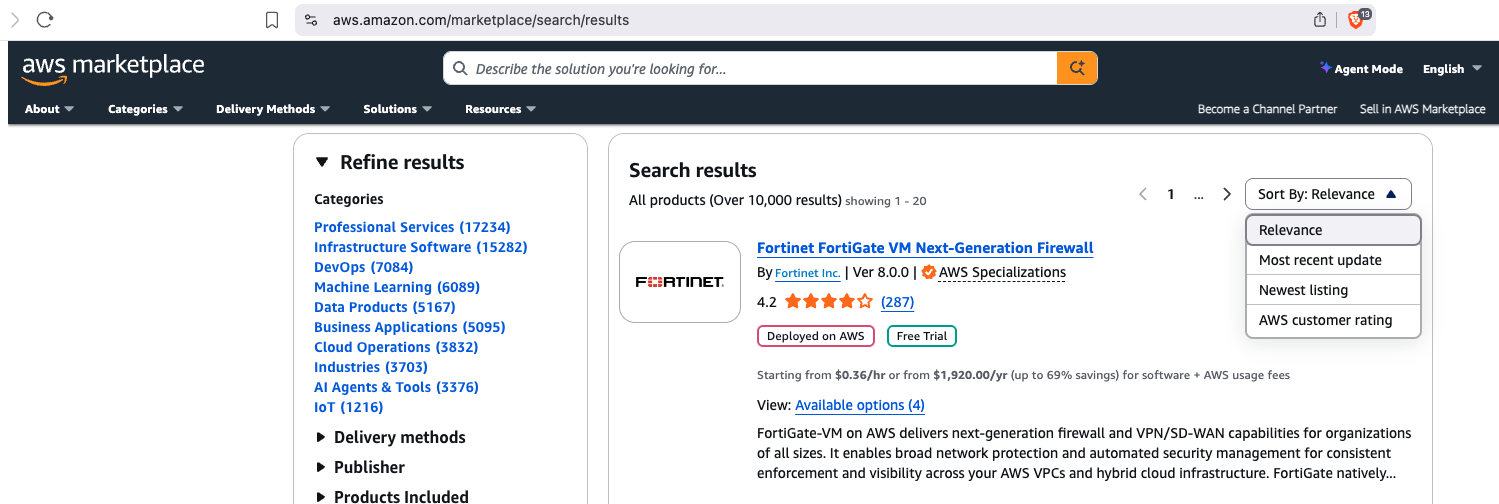
- Relevance - no parameter required
https://aws.amazon.com/marketplace/search/results - Most Recent Update - set the LAST_MODIFIED_TIME-DESCENDING parameter parameter
https://aws.amazon.com/marketplace/search/results?sort=LAST_MODIFIED_TIME-DESCENDING - Newest Listing - set the CREATION_TIME-DESCENDING parameter eg
https://aws.amazon.com/marketplace/search/results?sort=CREATION_TIME-DESCENDING - AWS Customer Reviews - set a parameter
https://aws.amazon.com/marketplace/search/results?sort=AVERAGE_CUSTOMER_RATING-DESCENDING
We have a bit more to say about the search ranking parameters that are available in the browser vs on the Discovery API - see our earlier post.
It makes sense that search result ranking by Relevance is the default, but its very opaque as to how AWS determines this, as it is with other types of web search, marketplace search, or even generative search. If you are a partner with a Marketplace listing you may have some inkling that these things can change over time.
However “Most Recent Update” is definitely a hackable property. Leaving aside anything else, using Most Recent Update will unsurprisingly order the search results by those listings which were updated most recently. And since evidence suggests a lot of listings are updated infrequently, you’ve got a better chance of being near the top if you make any update, or make regular updates.
Triggering Most Recent Update
Obviously Marketplace listing updates should be contentful - aligning products and services do evolve over time, and so does branding, positioning etc.
But to have the effect in terms of Most Recent Update, you can essentially ignore content. Keep reading, and you’ll see what we mean.
Using AWS Marketplace Management Portal (the UI, in a browser), you can obviously edit a listing in trivial ways to trigger a latest updated ranking boost. Simply add or remove some punctuation, or innocuously change a word, or switch a word and a symbol (and/&), submit the change and you’re off.
But that means you’re going to be remembering to log into PartnerCentral, go through the Marketplace Management listing editor and run the risk of your listing update not being processed (it seems a bit variable at the moment!).
An alternative is to kick off a simple listing ChangeSet via the Marketplace Catalog API.
You (or your systems team) can do this with your existing PartnerCentral login if it is paired with a Marketplace administration type role or any other IAM user that has either Marketplace Seller Products Full Access or Marketplace Full Access assigned via AWS IAM Managed Policies.
aws login
You don’t have to provide a comprehensive payload; you can be very selective or specific. In fact the best way is actually a pull-push pair:
0) Find the listing you want:
aws marketplace-catalog list-entities --catalog AWSMarketplace --entity-type SaaSProduct
Since the entity IDs don’t change for any given listing, you can probably just keep this list in your back pocket.
1) Pull the current listing description for the entity and process the output:
aws marketplace-catalog describe-entity --catalog AWSMarketplace --entity-id prod-XXXXXXXXXX | jq '[{
    ChangeType: "UpdateInformation",
    Entity: {
      Type: .EntityType,
      Identifier: (.EntityIdentifier | split("@")[0])
    },
    DetailsDocument: (
      {
        ProductTitle:       .DetailsDocument.Description.ProductTitle,
        ShortDescription:   .DetailsDocument.Description.ShortDescription,
        LongDescription:    .DetailsDocument.Description.LongDescription,
        Sku:                .DetailsDocument.Description.Sku,
        Highlights:         .DetailsDocument.Description.Highlights,
        SearchKeywords:     .DetailsDocument.Description.SearchKeywords,
        Categories:         .DetailsDocument.Description.Categories,
        LogoUrl:            .DetailsDocument.PromotionalResources.LogoUrl,
        VideoUrls:          (.DetailsDocument.PromotionalResources.Videos // [] | map(.Url)),
        SupportDescription: .DetailsDocument.SupportInformation.Description
      }
      | with_entries(select(.value != null and .value != []))
    )
  }]' > changeset.json
2) Open the changeset.json file in a text editor and make a change. Lets go for something super simple - just 3) adding an initial character ‘x’ to the Long Description. Save it.
4) Then push it back:
aws marketplace-catalog start-change-set --catalog AWSMarketplace --change-set-name "info-$(date +%Y%m%d-%H%M%S)" --change-set file://changeset.json

{
    "ChangeSetId": "mx0gmd4ndgk1nts38zabn4up",
    "ChangeSetArn": "arn:aws:aws-marketplace:us-east-1:XXXXXXXXXXXX:AWSMarketplace/ChangeSet/mx0gmd4ndgk1nts38zabn4up"
}
One thing to be aware of: the change-set mechanism is asynchronous - not instantaneous (if you’ve used the AMMP to submit a change you’ll be familiar with this!!). Pushing through simple “updated recently” changes via the API will receive a change-set-id response immediately but the actual work to process the change-set could take minutes to hours - to monitor status you can use:
aws marketplace-catalog describe-change-set --catalog AWSMarketplace --change-set-id <id>
The wrap up
Pushing a very simple text edit change set through the Marketplace Catalog API is enough to put your entry into latest updated listings. Where thats a filter a user sets for a query your product is returned in, you’re going to be closer to the top. More generally where latest updated is an input to a broader relevance rank, its an easy boost. And it can be trivially automated to be done daily, weekly, monthly without human intervention (or memory).